
Building gapless playback into Audiqa and its challenges
Playing the next track without a break sounds as simple as a checkbox. Well, naturally there's a lot more to the story and as it turned out the hardest part wasn't even a real problem after all.
When a DJ records a set in one continuous take, the sound never stops. There's no pausing between tracks it appeared later, when the recording was cut into pieces so it could be released. Every format we have used to keep sound imposes its own rules that way. Whatever holds a recording — the side of a disc, a track on a CD, a file in a folder — has a size and an end, and music longer than that has to be divided to fit. Once divided, something has to join it back up when you listen.
We call the joining gapless playback, as though it were a feature. Strangely, the name has it backwards: the gap is a side effect of the packaging, and removing it is actually a repair. Thus, this isn't a feature where you add something; it's a lot like a repair that makes you ask what broke, and where. That is the whole job of gapless playback.
Gapless playback in technical terms mean the last sample of one track is followed immediately by the first sample of the next, thus playback has no single gap in between tracks.
Digital audio never stores the wave itself. It stores a long run of separate measurements taken of that wave, one after another, close enough together that playing them back in order recreates it. Each of those measurements is a sample. CD-quality audio takes 44,100 of them every second, so a couple of thousand samples is a small fraction of a second — brief, but well inside what you could hear.
How two silences pretended to be one
Now that Audiqa has a beta macOS GUI and can play music files too, I wanted to give it a spin. My test case was LTJ Bukem featuring MC Conrad, Progression Sessions 6 - America Live 2001 — a set played to a room, recorded in one take, with Conrad on the microphone across the whole of it, then cut into separate tracks for release. The seams are where the craft is: one tune dissolving into the next, Conrad's voice riding across the joins. Put it on and after a few minutes you stop hearing individual tunes at all. What a masterpiece!
Given that Audiqa wasn't initially designed for gapless playback it broke that flow right away at every track boundary. Half a second of nothing is plenty: the flow drops, and the next tune arrives as a separate file rather than as the place the last one was going. The whole moment was ruined.
After some research and understanding, that one gap turned out to be two unrelated causes. The first lived in the player itself; let's call it the handover.
Audiqa played one file at a time, so when a track finished it tore down what it had built for that file, built it again for the next, and swapped it in — reading and unpacking enough of the new file to fill the buffer, the small store of ready-to-play audio the sound hardware draws from. Quick, but not instant, and it happens after the previous track has already gone quiet. It hits every format, lossless included. It wasn't a defect: the player was built to play one file at a time and was never aimed at continuous playback.
The second issue is inside the files themselves — the buried silence — and it is an older and stranger problem. MP3 and AAC are lossy: they discard detail the ear is unlikely to miss, and they store sound in fixed-size blocks rather than sample by sample. A decoder, the program that unpacks a file back into sound, needs a short run-up before what comes out is correct, so the encoder writes a stretch of silence at the front for it to chew through and discard: the so called priming samples. A recording almost never divides evenly into blocks either, so the encoder tops up the final block with silence: padding.

Neither is a mistake; both are the format doing what it was built to do. But they are extra silence inside every MP3 and AAC file you own, and at a boundary you meet two of them back to back:
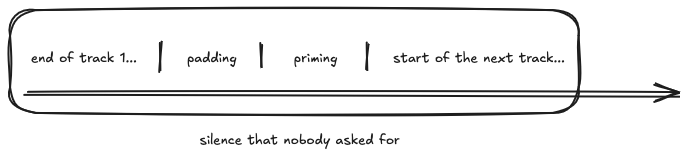
In my test files: 576 priming samples for MP3, 2,112 for AAC — the AAC figure alone around a twentieth of a second. Lossless files carry neither, so whether gapless is "already fine" or "obviously broken" depends on what your library is made of. Mine is a mix of MP3s, AAC and lossless, so I had both faults.
Two faults that sounded like one symptom set a trap: fix either alone and you still hear a gap. Had I closed the handover issue first, I would have played the mix, heard the same stumble, and thrown away a fix that was actually correct. Luckily I went in to understand the problem first and managed to fix both issues. But the story did not end here.
Ditching the macOS built-in audio player
Audiqa's macOS app was initially built using a standard media file player that had been handing me elapsed time, duration, pause, seek (jumping to a point partway through by dragging the playhead), and recovery from things like headphones being pulled out — none of it written by me. It's all something on macOS, the Core Audio framework provides for free. Go around that player and every one of them becomes your own problem to solve and to potentially get wrong.
I could have kept the old player and let it hold a list of what is coming, so it prepares the next file while the current one still plays. That would have closed the handover problem (and for a library of lossless file it would likely have been the whole answer) but that still did nothing about the buried silence.
So instead, I decided to do the right thing and drop below the original player and built an audio graph. With this approach you hand the sound hardware pieces of audio yourself, each one stamped with the moment it should start playing. That is what scheduling means here, and it lets you append the next file while the current one is still running, so it is already waiting at the hardware when the track boundary arrives.
The problem that was never there
The graph fixed the handover. What was left was the trim: cutting the buried silence out of every file, at both ends, at every boundary. That meant knowing exactly how many samples to remove — and every format writes that number somewhere different: a header for MP3, a tag for AAC, a field for Opus, page structure for Vorbis, etc. Each format needed its own small piece of code to find and read that number, a parser, built to cope with files where the number is missing or wrong.
I scoped it, wrote the design and before writing a single line of the parser, I decided to actually test something I had only assumed: that the silence would still be there by the time the audio reached the player.
I built a test file of a fixed length — a tone at the start, a tone at the end, silence in between, exactly 44,100 samples — and encoded it as MP3, AAC, and ALAC. Then I opened each file the way Audiqa would and checked how long it reported itself to be, and where the sound actually started.
| file length | first sound at | silence written into the file | |
|---|---|---|---|
| original | 44,100 | sample 0 | none |
| MP3 | 44,100 | sample 0 | 576 priming |
| AAC | 44,100 | sample 0 | 2,112 priming |
| ALAC | 44,100 | sample 0 | none |
Every file, even MP3 and AAC with their silence baked in, reported the true length and started at sample 0. The system's own decoder had already read those same numbers and trimmed the silence — before my own code ever saw the audio.
There was nothing left to build. Priming and padding are real but macOS's Core Audio handles them out of the box. That meant there was no decoder was going to have to write. Well, not for macOS at least.
So what's playing right now?
With the silence gone, what's left is a timing problem — and this one I created myself, by writing my own scheduler.
The standard player knew which track was playing because it played one file and stopped when that file ended — "the track changed" was an event that the player UI could hang onto. The graph however has no such moment: it's one continuous stretch of sound, no markers, nothing announcing a boundary. Audiqa has to work out where it is on its own.
What the graph offers instead is a count, climbing by 44,100 every second since playback began. Every time Audiqa schedules a file, it writes down where that file starts on the count.
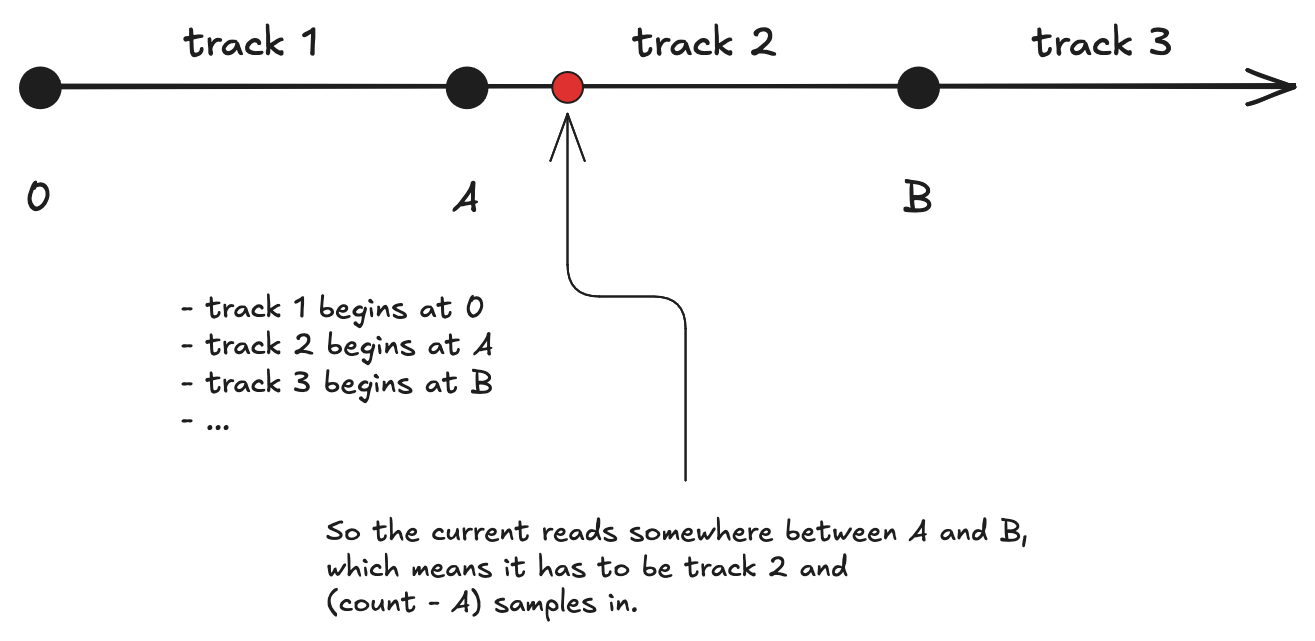
You work out which track is currently playing by the last entry whose start is below the current count. To know how far you are in, you just subtract. Everything can be calculated by one number, one short list, and the interface never has to be told anything.
There's a shortcut that looks tempting: the system tells you when a track's audio has been consumed — handed off to the hardware, on its way to the speakers. It fires once per track, right at a boundary, and looks exactly like the event the old player gave me. Well, ... it isn't. That's because handing over is not the same as hearing: there's a buffer that keeps playback ahead of your ears to ensure hiccups could be fixed on time before they are becoming audible. It also means that it finishes processing tracks while you are still listening to them.
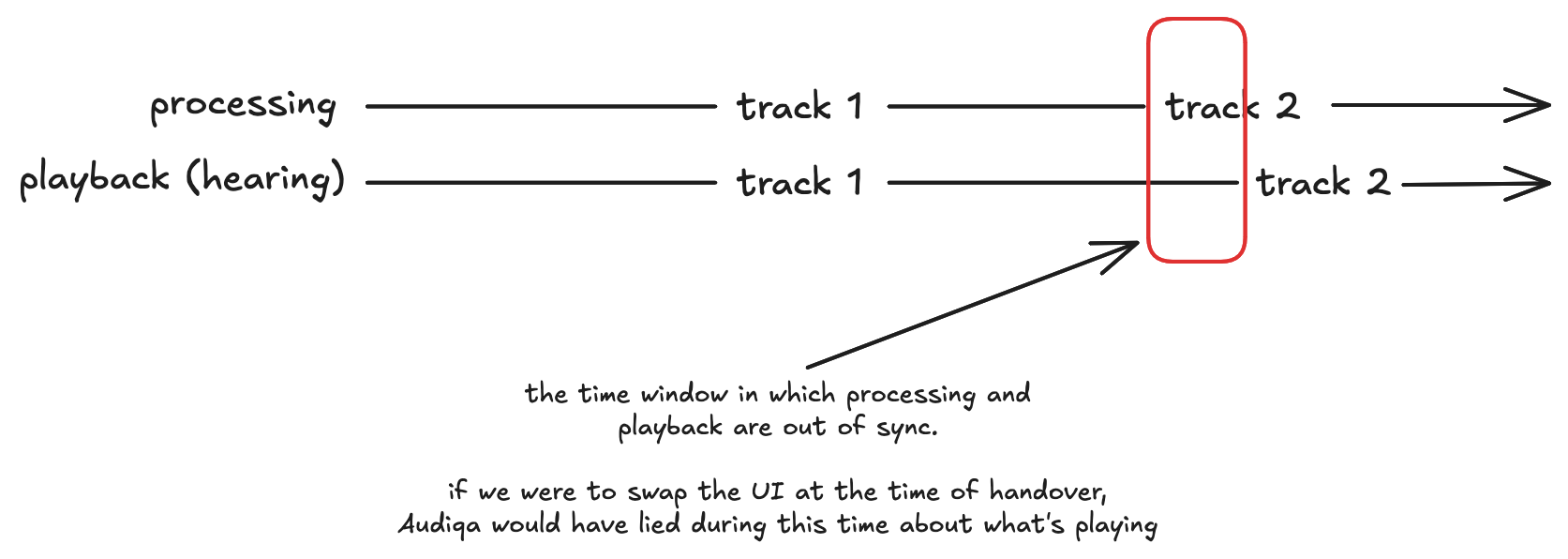
That lead isn't a flaw — it's the mechanism: track 2 has to be handed over before track 1 finishes, or there's a gap again. Trust it for the title instead, and the display jumps to track 2 while track 1 is still playing — a small, glitchy lie. So it keeps one job: a cue to fetch the next file. The screen changes when your ears do.
Seeking pulls the two apart even further. The count only moves forward — it can't rewind, and it can't reset at a boundary without bringing back the seam I just removed. So a seek moves the list, not the count: Audiqa drops what it had scheduled, schedules again from the new position, and rewrites the note so the same rising number means something else. All that in a fraction of a second that is virtually unnoticeable.
So yeah, sometimes making playback continuous means giving up some of the functionality that just used to work out of the box. Asking "which track is this?" isn't a straight answer anymore. But all in all, the end result is now a much more seamless user experience that I will gladly take.
Putting on Progression Sessions 6 and listening to it end to end proved that it was worth it. Audiqa played it as it was meant to be played: In one continuous eargasm that just keeps flowing without any gaps. That's the UX I was after.
If you want to follow the process behind the development of Audiqa you can subscribe to updates via a standard RSS feed or the low-traffic Bluesky and X profiles.